 CueCart
 Broadcast processing
Pick a processing preset and let CueCart's master-bus dynamics keep your output consistent and safe.
Audio · Updated 2026-07-24
CueCart shapes the loudness of everything it plays through a single processing preset, then guards the result with an always-on safety soft-clip. You don't have to tune anything to sound good — pick the preset that suits the room, and CueCart keeps your output consistent and safe across the whole show.
Open Settings (the gear, or Tools → Settings) and go to Audio → Processing to find it.
Processing presets
A processing preset is a calibrated point on a real master-bus dynamics chain. Picking one sets a loudness style for the open set. Choose the one that matches what you're doing:
- Off — no preset normalisation. Your cues play at their stored gain. The safety soft-clip still runs.
- Clean — balanced, safe default. Sits close to Off, with gentle 2.0:1 compression.
- DJ — louder music playback with +3 dB input gain and 2.0:1 compression.
- Party — loud and energetic, with +3 dB input gain and 2.6:1 compression.
- Radio — broadcast-style, tightly controlled, with +6 dB input gain and fast 9.0:1 compression.
- Office — cuts through a room, with +6 dB input gain and 6.0:1 compression with a very soft knee.
Pick a preset with the six-button selector at the top of the tab. The choice applies across the open set and stays put between sessions, so once you've chosen the right profile for your venue you can leave it. Each cue's own volume offset still applies on top of the preset, so you keep your per-pad balance.
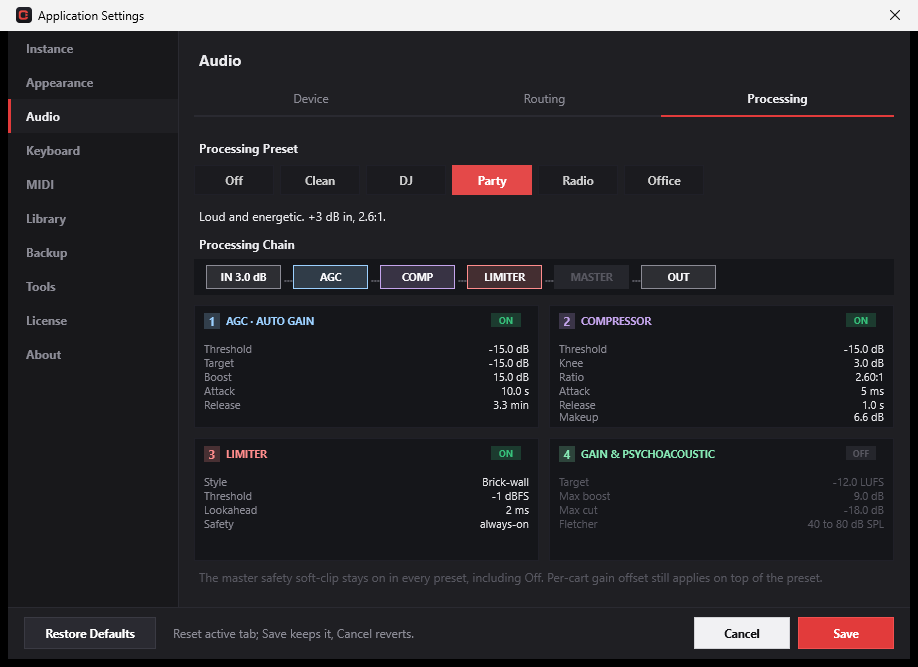 Broadcast processing with the Party preset selected.
The signal chain
Below the selector, a signal-flow strip shows exactly what your audio passes through on the master bus:
IN ▸ AGC ▸ COMP ▸ LIMITER ▸ MASTER ▸ OUT
Each preset lights up the stages it uses and dims the ones it leaves bypassed, and these are real processors running on the master bus every block — not a preview. A 2×2 grid of parameter cards under the strip shows the active preset's values, so you can see at a glance how it's set up:
- AGC (Auto Gain) — a slow level rider that sits before the master fader, nudging the overall level toward the preset's target without warping transients. Cards show its threshold, target, boost, attack and release.
- Compressor — a post-fader compressor that catches peaks. Cards show threshold, ratio, attack, release and make-up gain.
- Limiter — the always-on safety soft-clip (see below).
- Gain & psychoacoustic — the preset's loudness target and the normalisation boost/cut limits.
The cards are read-only — they reflect the chosen preset's calibrated values. A Custom preset with editable sliders is on the roadmap, but in this version you choose from the six built-ins above.
The always-on safety soft-clip
Whichever preset you pick — even Off — a master safety soft-clip runs as the final stage in the chain. Rather than a hard ceiling, it's a smooth curve: quieter signal passes through untouched, and as the level climbs it bends gently toward an asymptote just under full scale (around -1 dBFS). A hot cue or a stacked pile-up of voices can't slam your output into hard digital clipping, and because the curve matches the signal's slope where it kicks in, there's no audible kink. It's always on and you can't switch it off — its only job is to protect your signal at the very end of the path.
Related
- Audio setup — choose your output device and wire up a separate headphone cue bus.
- Cue Editor — set each cue's own volume offset, which applies on top of the preset.