 CueCart
 Get CueCart for Windows
Every feature, free for 30 days — no card required. Install it, build a show, and decide on your own time.
CueCart for Windows
Install & open
Run the installer and launch CueCart. Your 30-day trial starts on first run — no account needed.
Build your wall
Drag audio from Explorer onto pads, set colours and fades, and group your cues into banks.
Go live
Pick your output device, route your cue bus to headphones, and run the show.
System requirements
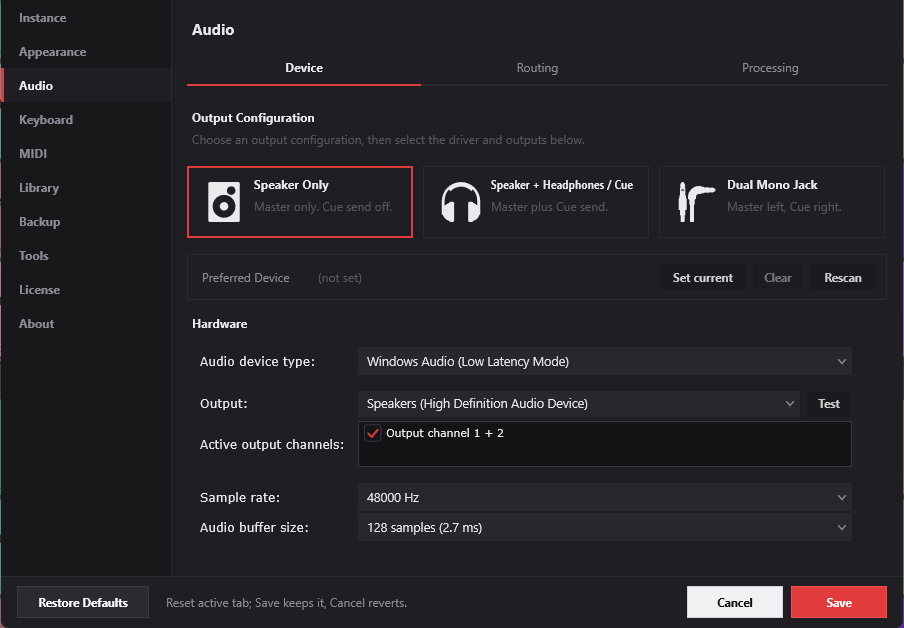
Full audio device control, output-bus routing and a tunable broadcast processing chain — included in every download.
Try everything, commit when you're ready
The download is the complete app — every feature unlocked for 30 days, no card required. Anything you build during the trial is yours and carries straight over when you buy. CueCart runs fully offline, and your license activates on one machine — moving it to a new one is a quick reset away.
Two minutes to your first cue.
Download, drop in audio, hit a pad. That's the whole onboarding.